

Databricks
Databricks is a unified data analytics platform built on Apache Spark, designed for data engineering, machine learning, and analytics at scale. When combined with Tensorlake’s document parsing and serverless agentic application runtime, you can build AI workflows and agents which can automate processing of Documents and other forms of unstructured data and land them in Databricks. In Databricks’s Medallion Architecture, Tensorlake can extract semi-structured (JSON) or structured data from unstructured data and land it in Bronze stage tables in Databricks. This enables enterprises to increase data coverage in Databricks for downstream analytics use cases.Integration Architecture
There are two main ways of integrating Tensorlake with Databricks:- Document Ingestion API: Use Tensorlake’s Document Ingestion API from Databricks Jobs or Notebooks to extract structured data or markdown from documents, then load them into Databricks tables.
- Full Ingestion Pipeline on Tensorlake: Build the entire pipeline of ingestion, transformation, and writing to Databricks on Tensorlake’s platform. These pipelines are exposed as HTTP APIs and run whenever data is ingested, eliminating infrastructure management and scaling concerns. Tensorlake allows you to write distributed Python applications, making the developer experience of building and deploying scalable pipelines.
Installation
Quick Start: Simple Document-to-Database Integration
This example demonstrates the core integration pattern between Tensorlake’s DocumentAI and Databricks.Step 1: Extract Structured Data from a Document
Define a schema and extract structured data using Tensorlake:Step 2: Load Data into Databricks
Connect to Databricks SQL Warehouse and insert the extracted data:How the Integration Works
The integration follows a straightforward pipeline:- Document Processing: Tensorlake’s DocumentAI parses documents and extracts structured data based on your Pydantic schemas
- Database Loading: Data is loaded into Databricks tables using the Spark DataFrame API
- Orchestration: You can orchestrate this process from Databricks Jobs, Notebooks or any other orchestrator.
Full Ingestion Pipeline on Tensorlake
The orchestration of your ingestion pipeline happens on Tensorlake. You can write a distributed and durable ingestion pipeline in pure Python and Tensorlake will automatically queue requests as they arrive and scale the cluster to process data. The platform is serverless, so you only pay for compute resources used for processing data.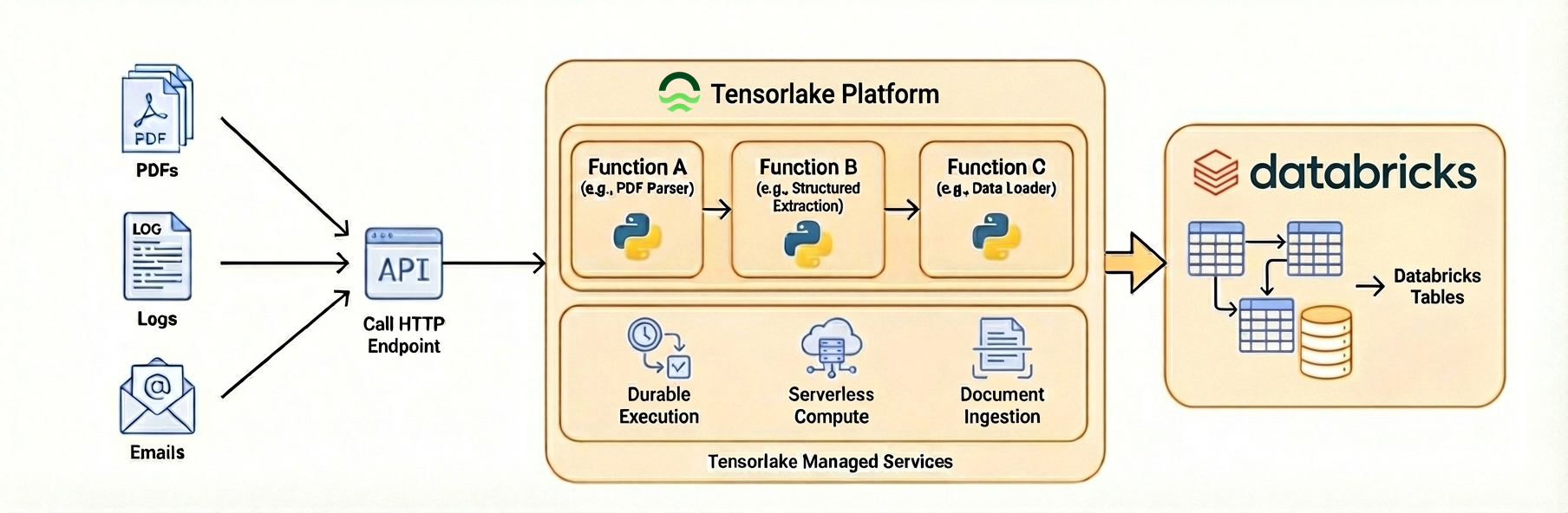
What’s Next?
Learn more about Tensorlake and Databricks:- Structured Extraction Guide - Define custom schemas
- Applications Documentation - Deploy production pipelines
- Databricks Documentation - Learn more about Databricks features