> ## Documentation Index
> Fetch the complete documentation index at: https://docs.tensorlake.ai/llms.txt
> Use this file to discover all available pages before exploring further.
# Authentication
> Learn how to make API requests to the Tensorlake APIs
## Tensorlake Account
You need to have a Tensorlake Cloud account to make API requests if you're using the Python SDK, the `tensorlake` npm package, a generated TypeScript client, or directly
calling the REST API. You can create an account on [cloud.tensorlake.ai](https://cloud.tensorlake.ai).
## API keys
API keys are project-specific credentials that allow programmatic access to resources within a project. Each API key exists
solely within the context of its project and has the [same permissions as a project member](/platform/access-control#project-access-control-permissions).
API keys cannot have organization-level permissions.
#### Creating API keys
1. Go to the [Tensorlake Dashboard](https://cloud.tensorlake.ai)
2. Select the project to make API calls against.
3. Create an API key.
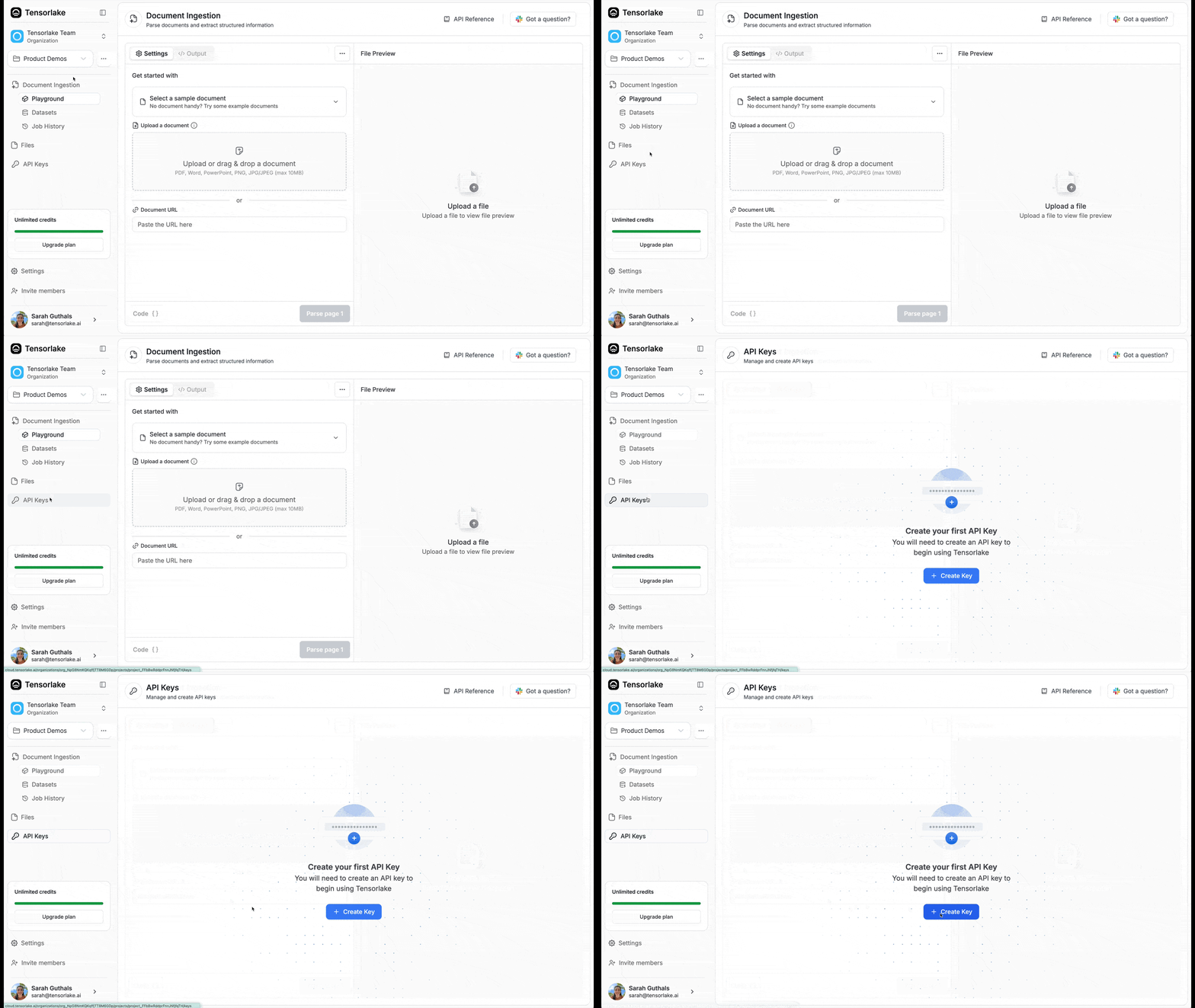 Every tensorlake API key starts with `tl_apiKey_*`.
## Tensorlake Python SDK
The [Tensorlake SDK](https://github.com/tensorlakeai/tensorlake) leverages API keys for authentication.
For example:
```python your_app.py theme={null}
from tensorlake.documentai import DocumentAI, ParsingOptions
API_KEY="tl_apiKey_xxxx"
doc_ai = DocumentAI(api_key=API_KEY)
file_id = doc_ai.upload(path="/path/to/file.pdf")
parse_id = doc_ai.read(file_id=file_id, parsing_options=ParsingOptions())
```
## TypeScript
For sandbox and cloud/application APIs, use the official `tensorlake` npm package.
```bash theme={null}
npm install tensorlake
export TENSORLAKE_API_KEY=your-api-key-here
```
```ts theme={null}
import { Sandbox } from "tensorlake";
const sandbox = Sandbox.create({
apiKey: process.env.TENSORLAKE_API_KEY,
});
```
These examples assume Node.js 18+, Bun, or Deno so `fetch` is available globally.
The current npm package covers sandboxes plus cloud/application APIs. Document Ingestion TypeScript examples still use a generated client from Tensorlake's public OpenAPI schema:
```bash theme={null}
npm install @hey-api/client-fetch
npm install -D @hey-api/openapi-ts typescript
npx @hey-api/openapi-ts \
-i https://docs.tensorlake.ai/api-reference/openapi.yaml \
-o src/lib/tensorlake \
-c @hey-api/client-fetch \
-p @hey-api/sdk
```
Use the npm package inline on pages that already show Python examples:
* [Sandboxes](/sandboxes/introduction)
## REST API
REST API requests needs to include the API key in the header as a Bearer Token.
For example, to make a request to the Document File Management API, you would use the following curl command:
```bash theme={null}
curl --request POST \
--url https://api.tensorlake.ai/documents/v2/files \
--header 'Authorization: Bearer ' \
--header 'Content-Type: multipart/form-data' \
--form 'labels={}'
```
For enterprise SSO, see [Single Sign-On (SSO)](/platform/sso).
## Frequently Asked Questions
You can regenerate your API key from the Tensorlake Dashboard. Go to your project settings, find the API keys section, and create a new key. Remember to update your applications with the new key.
{" "}
No, API keys are project-specific. Each API key only works within the context
of the project where it was created. You'll need separate API keys for each
project.
{" "}
API keys have the same permissions as a project member. They cannot have
organization-level permissions and are limited to project-specific operations.
{" "}
Create a new API key first, update your applications to use the new key, then
delete the old key from the dashboard. This ensures no downtime during
rotation.
{" "}
Immediately delete the compromised API key from the Tensorlake Dashboard and
generate a new one. Update all applications using the old key as soon as
possible.
{" "}
API keys do not have explicit expiration dates. Each API key will remain
active until it is deleted.
{" "}
This usually means your API key is invalid, was deleted, or is not properly
included in the Authorization header as a Bearer token. Verify your key exists
in the project you expect on the Tensorlake Dashboard, then verify format and
header structure.
{" "}
Use environment variables or secure credential management systems. Never
hardcode API keys in your source code or commit them to version control.
{" "}
API keys are for programmatic access and machine-to-machine communication,
while user authentication is for interactive dashboard access. API keys don't
expire with user sessions.
API keys inherit project member permissions.
Every tensorlake API key starts with `tl_apiKey_*`.
## Tensorlake Python SDK
The [Tensorlake SDK](https://github.com/tensorlakeai/tensorlake) leverages API keys for authentication.
For example:
```python your_app.py theme={null}
from tensorlake.documentai import DocumentAI, ParsingOptions
API_KEY="tl_apiKey_xxxx"
doc_ai = DocumentAI(api_key=API_KEY)
file_id = doc_ai.upload(path="/path/to/file.pdf")
parse_id = doc_ai.read(file_id=file_id, parsing_options=ParsingOptions())
```
## TypeScript
For sandbox and cloud/application APIs, use the official `tensorlake` npm package.
```bash theme={null}
npm install tensorlake
export TENSORLAKE_API_KEY=your-api-key-here
```
```ts theme={null}
import { Sandbox } from "tensorlake";
const sandbox = Sandbox.create({
apiKey: process.env.TENSORLAKE_API_KEY,
});
```
These examples assume Node.js 18+, Bun, or Deno so `fetch` is available globally.
The current npm package covers sandboxes plus cloud/application APIs. Document Ingestion TypeScript examples still use a generated client from Tensorlake's public OpenAPI schema:
```bash theme={null}
npm install @hey-api/client-fetch
npm install -D @hey-api/openapi-ts typescript
npx @hey-api/openapi-ts \
-i https://docs.tensorlake.ai/api-reference/openapi.yaml \
-o src/lib/tensorlake \
-c @hey-api/client-fetch \
-p @hey-api/sdk
```
Use the npm package inline on pages that already show Python examples:
* [Sandboxes](/sandboxes/introduction)
## REST API
REST API requests needs to include the API key in the header as a Bearer Token.
For example, to make a request to the Document File Management API, you would use the following curl command:
```bash theme={null}
curl --request POST \
--url https://api.tensorlake.ai/documents/v2/files \
--header 'Authorization: Bearer ' \
--header 'Content-Type: multipart/form-data' \
--form 'labels={}'
```
For enterprise SSO, see [Single Sign-On (SSO)](/platform/sso).
## Frequently Asked Questions
You can regenerate your API key from the Tensorlake Dashboard. Go to your project settings, find the API keys section, and create a new key. Remember to update your applications with the new key.
{" "}
No, API keys are project-specific. Each API key only works within the context
of the project where it was created. You'll need separate API keys for each
project.
{" "}
API keys have the same permissions as a project member. They cannot have
organization-level permissions and are limited to project-specific operations.
{" "}
Create a new API key first, update your applications to use the new key, then
delete the old key from the dashboard. This ensures no downtime during
rotation.
{" "}
Immediately delete the compromised API key from the Tensorlake Dashboard and
generate a new one. Update all applications using the old key as soon as
possible.
{" "}
API keys do not have explicit expiration dates. Each API key will remain
active until it is deleted.
{" "}
This usually means your API key is invalid, was deleted, or is not properly
included in the Authorization header as a Bearer token. Verify your key exists
in the project you expect on the Tensorlake Dashboard, then verify format and
header structure.
{" "}
Use environment variables or secure credential management systems. Never
hardcode API keys in your source code or commit them to version control.
{" "}
API keys are for programmatic access and machine-to-machine communication,
while user authentication is for interactive dashboard access. API keys don't
expire with user sessions.
API keys inherit project member permissions.